Devpost Online Hackathons: How a Beginner Can Win a First Prize (Popular Choice or Special Award)
Choosing a Devpost hackathon, checking deadlines and eligibility, a submission template, demo video order, reading judging criteria, and claiming a prize (W-8BEN, PayPal, Wise, Payoneer), based on official help articles.
This guide is not about the grand prize. It is for beginners aiming at relatively smaller awards such as Popular Choice/People's Choice and special category prizes. It does not guarantee a prize. Instead, it helps you avoid mistakes in two areas: "not getting disqualified" and "showing your work in line with the judging criteria."
1. First things first: signing up ≠ registering
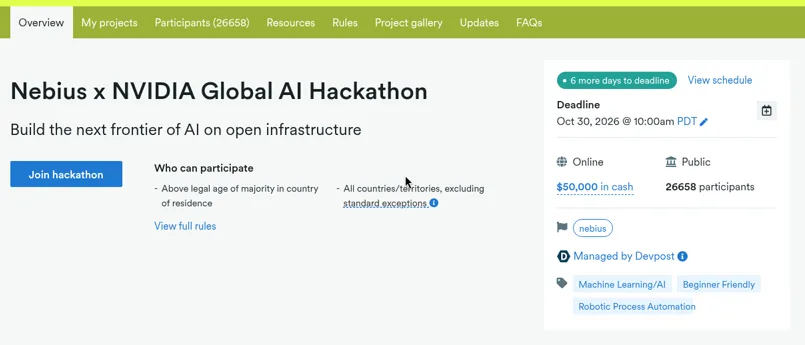
Creating a Devpost account does not register you for any hackathon. You need to click the "Join hackathon" button, shown on the hackathon page while the submission period is open, to access the submission form. (Source: help.devpost.com/article/119)
You can unregister only until you create a draft for that hackathon. (Source: same article)
The "Join hackathon" button is in the main column of the hackathon's Overview page, right below the hackathon title and one-line description. The box on the right shows summary information such as the Deadline, whether it is online, the prize amount, and the number of participants.
2. Choosing a hackathon: reading the list and filters
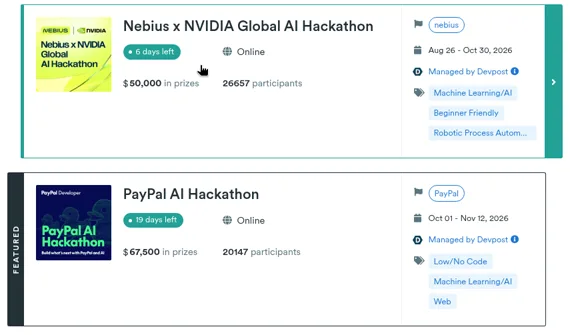
The hackathon list is at https://devpost.com/hackathons. Each card in the list usually shows:
- Whether it is online or in person ("Online" label)
- Time left to submit (e.g., "6 days left") and the submission period dates
- Interest tags — e.g., a "Beginner Friendly" tag does exist
- Total prize amount and number of registered participants
- Some carry a "Managed by Devpost" badge
(Items above confirmed from the data loaded by the list page as of 2026-10-24. Source: devpost.com/hackathons)
Conditions that suit beginners (rules of thumb)
These are selection tips, not official rules.
- Online, with plenty of submission time left. Devpost's help center gives a sample schedule for a two-month hackathon and recommends finishing your submission 5 days before the deadline. A contest with only a few days left is a poor first attempt. (Source: article/125)
- Many prizes. The list data counts cash prizes and other prizes separately. Look at the number and types of prizes rather than the total amount. A contest with several category and special prizes gives beginners more chances than one where a large sum goes to a single first place.
- Prizes relative to registrations. The number of registrants is visible in the list, but actual submissions are usually fewer (some people register and never submit). The exact number of submissions is not known before the deadline, so treat it as a rough guide only.
- The "Beginner Friendly" tag. The tag does not mean there is a beginners-only prize. Always check the Prizes section.
- Whether Prizes includes Popular Choice or special category awards. Don't stop at the prize name; check in the Rules how the winner is chosen (public vote or judges' scores).
The filters on the left of the list
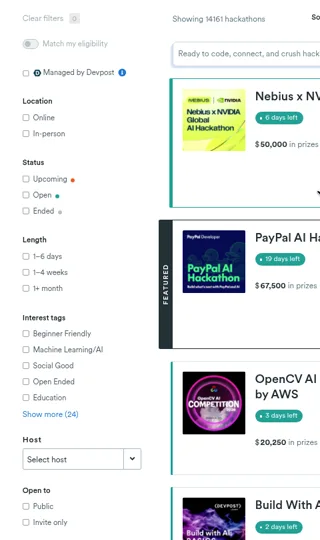
The left column of the list page has these filters (confirmed on the actual screen on 2026-10-24):
- Clear filters — removes all selected filters
- Match my eligibility — an on/off toggle
- Managed by Devpost — a checkbox
- Location — Online / In-person
- Status — Upcoming / Open / Ended
- Length — 1–6 days / 1–4 weeks / 1+ month
- Interest tags — Beginner Friendly, Machine Learning/AI, Social Good, Open Ended, Education and more (expand with Show more)
- Host — a Select host dropdown
- Open to — Public / Invite only
There is no filter called "Theme." Topics are chosen through Interest tags. As a beginner, one approach is to narrow down to Location: Online, Status: Open, Length: 1–4 weeks or longer, Interest tags: Beginner Friendly, and Open to: Public, then read the Prizes and Rules of the remaining contests one by one.
3. Confirmed facts about Popular Choice (voting)
This is how Devpost's public voting works. (Source: article/82)
- You need a Devpost account to vote.
- One person can vote for multiple projects, but only once per project.
- Vote counts are not made public.
- Devpost likes, Facebook likes and tweets do not count as votes.
- Devpost says it checks for fraudulent voting both manually and automatically.
In other words, Popular Choice requires "share the link → real people log in and vote." Do not do anything that could look like vote manipulation (creating multiple accounts, offering something in exchange for votes, etc.). Each hackathon may have its own Popular Choice rules, so read the Rules first.
4. How to check deadlines and eligibility
Deadline
- The box on the right of the hackathon's Overview page shows the Deadline, and the "View schedule" link shows the full schedule. (Confirmed on the actual screen on 2026-10-24. Help article/103 refers to this schedule link as "view all dates.")
- Check the deadline including the time zone, convert it to your local time and put it in your calendar.
- If you miss the deadline, allowing a late submission is at the organizer's discretion, and many contests don't allow it. (Source: article/112)
- You can keep editing your submission until the deadline. After the deadline, you can still edit the project in your portfolio, but the changes won't be reflected in the hackathon submission. (Source: article/123) → It is safer to submit early and keep improving it.
Eligibility
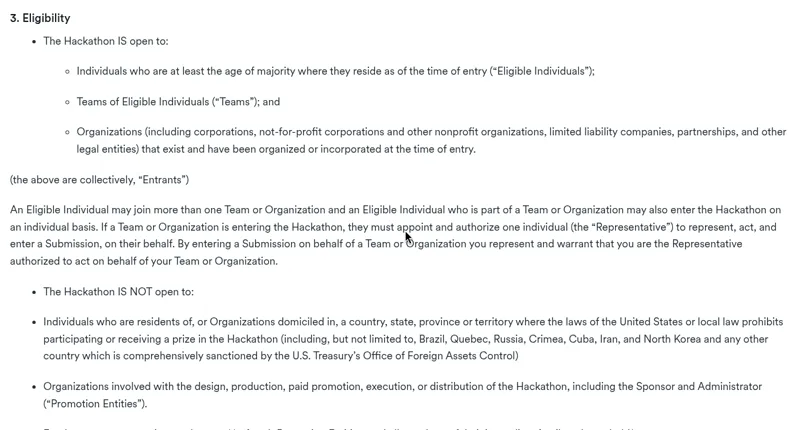
Always read the Eligibility section of the Rules page. For example, one real contest's rules said that individuals "above the legal age of majority in their country of residence," teams and organizations could enter. (Source: example Rules page, see sources.md) It differs by contest, so check:
- Age requirements (the age of majority varies by country)
- Country-of-residence restrictions (whether certain countries are excluded)
- Clauses excluding sponsor employees and affiliates
- Team size limits
- Required tools (API/SDK)
- Conditions on whether the project was newly built or improved during the hackathon period
The prize claim step also checks your date of birth, country of residence, whether you are a sponsor employee and so on (Source: article/114). If your eligibility is unclear, asking the organizer before entering is better than having a prize revoked afterward.
5-minute check (free version)
- [ ] I clicked "Join hackathon" and registered
- [ ] I converted the deadline to my local time and put it in my calendar
- [ ] I checked the age, country and employee conditions in Eligibility
- [ ] I picked 1–2 prizes to aim for from Prizes
- [ ] I copied the Judging Criteria
The paid part covers a template you can paste straight into the submission page, the order for your demo video, how to read judging criteria, the steps to receive prize money after winning, and a final checklist.
<!--PAYWALL-->
Read the rest
One pass ($7.99) unlocks all 6 money guides.